

The DS-160 Form is the first and most important step in applying for a U.S. non-immigrant visa. It is an online application that collects your personal, travel, and background information, which will be reviewed by the U.S. Department of State. Completing it accurately is essential, as the form serves as the basis for your visa interview and decision.
Don't know what to do ?
Get Free Counseling
DS 160 Form Online – Complete Guide for U.S. Visa Applicants
What is the DS-160 Form Online?
The DS-160 is the mandatory online application form for all U.S. non-immigrant visas, including visitor, student, business, exchange visitor, and temporary work visas. Applicants must complete this form electronically before beginning the visa application process.
The DS-160 collects important details such as personal, travel, and background information, which U.S. consular officers use to process your visa application. It is required for:
- Tourists and business travelers applying for a B1/B2 visa
- Students applying for F1 or M1 visas
- Exchange visitors under the J1 visa category
- Temporary workers applying for work-related visas
- Dependents of primary visa holders
Submitting the DS-160 is a prerequisite before scheduling your U.S. visa interview. Once completed, you receive a confirmation page with a barcode, which must be presented at the embassy or consulate during your appointment.
Who Should Complete the DS-160 Form Online?
The DS-160 Form is a mandatory requirement for all applicants of U.S. non-immigrant visas. Every individual seeking to travel to the United States temporarily must complete this form, regardless of age or visa category. Each applicant, including children and dependents, must fill out a separate DS-160 to ensure accurate processing by the U.S. Embassy or Consulate.
You will need to complete the DS-160 if you fall under any of the following categories:
- Tourists and business travelers (B1/B2 visa): For short-term visits to the U.S. for leisure, medical treatment, business meetings, or conferences.
- Students (F1 or M1 visas): For those pursuing academic degrees, vocational training, or language studies in the U.S.
- Exchange visitors (J1 visa): For applicants participating in approved exchange programs, including internships, research, or cultural exchange.
- Temporary workers: Individuals applying for non-immigrant work visas, such as H, L, O, or other employment-based categories.
- Dependents of primary visa holders: Spouses and children accompanying the main visa applicant must also file their own DS-160.
Note: Completing the DS-160 is an essential step before scheduling your U.S. visa interview, as it allows consular officers to review your background and determine your eligibility for the chosen visa category.
How to Access the DS-160 Form Online?
The DS-160 Form can only be completed and submitted online through the Consular Electronic Application Center (CEAC) portal. Applicants must ensure that they select the correct U.S. Embassy or Consulate where they intend to attend their visa interview, as this determines where the application will be processed.
When starting the application, you will be provided with a unique Application ID. It is important to save this ID securely, as it allows you to log back in and complete the form later if needed. Applicants are also encouraged to note down the security question and answer set at the beginning of the form, as this will be required to retrieve the application.
Once the DS-160 is completed and submitted, you will receive a confirmation page with a barcode, which must be printed and presented during your visa interview at the embassy or consulate.
Step-by-Step Guide to Filling the DS-160 Form Online
Filling out the DS-160 requires accuracy and careful attention, as this form is the foundation of your U.S. visa application. Follow these steps to complete it:
Step 1 – Start the DS-160 Application
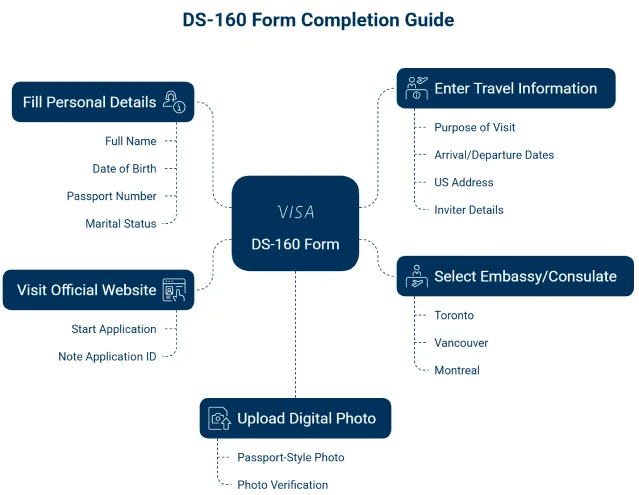
Go to the official online application portal and select the U.S. Embassy or Consulate where you will attend your visa interview. You will receive a unique Application ID—save it for future access.
Step 2 – Enter Personal and Passport Details
Provide your full name, date of birth, nationality, passport number, passport issue/expiry dates, and other identity details exactly as they appear in your passport.
Step 3 – Provide Travel Information and U.S. Contact Details
Enter the purpose of your trip, intended dates of travel, address where you will stay in the U.S., and details of your U.S. contact person, organization, or hotel.
Step 4 – Add Employment and Education History
Include your current and previous employment, education, and professional background. This information helps consular officers assess your eligibility.
Step 5 – Upload Your Digital Photo
Upload a recent passport-style photo that meets U.S. visa photo requirements (correct size, background, and clarity). If the upload fails, you will need to bring a printed photo to the interview.
Step 6 – Review and Confirm Details
Carefully check all the information you entered. Errors may delay processing or cause issues during your interview. Make corrections before submitting.
Step 7 – Submit the DS-160 Form Online
Once reviewed, submit your form electronically. After submission, no changes can be made, so ensure accuracy before proceeding.
Step 8 – Print the DS-160 Confirmation Page with Barcode
After submission, a confirmation page with a unique barcode will be generated. Print this page, as it is mandatory for scheduling and attending your visa interview.
Documents Required for DS-160 Form Online
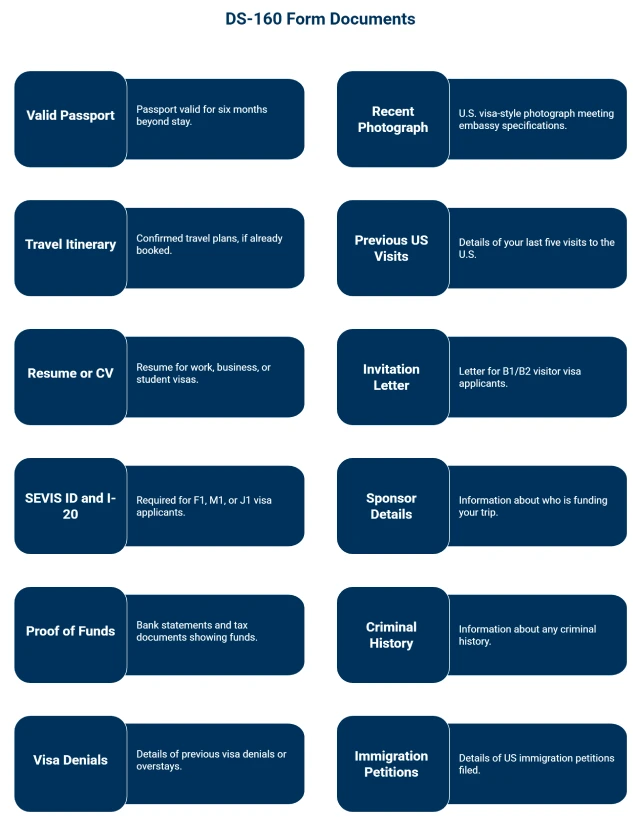
Before starting the DS-160 application, it is important to keep certain documents and information ready. Having these details in hand will help you complete the form smoothly and without delays. The required documents include:
- Valid passport: Must be valid for travel to the U.S. with a validity date at least six months beyond your intended stay (unless exempt by country-specific agreements).
- Recent U.S. visa-style photo: A digital photo that meets official U.S. visa requirements, or a printed photo if the online upload fails.
- Previous travel history: Information about your past U.S. visits, including dates and visa details, if applicable.
- U.S. contact details: The name, address, and phone number of a U.S. contact (such as a friend, relative, employer, hotel, or business).
- Employment and education information: Details of your current and past employment, educational background, and professional history.
- Travel itinerary (if available): Expected travel dates, flight bookings, and accommodation details, if already planned.
Note: Keeping these documents accessible ensures that the DS-160 form can be filled out accurately and completely, reducing the risk of delays in the visa process.
DS-160 Form Online – Photo Requirements
When completing the DS-160, applicants must upload a digital photo that meets strict U.S. visa requirements. If the photo upload fails, you must bring a printed copy that follows the same standards to your visa interview. The key requirements are:
- Size: The photo must measure 2 x 2 inches (51 x 51 mm).
- Background: It should have a plain white or off-white background, with no patterns or shadows.
- Recent photo: The photo must have been taken within the last six months to reflect your current appearance.
- Full face visible: Your face should be directly facing the camera with a neutral expression, eyes open, and both ears visible. Head coverings are allowed only for religious or medical reasons, and must not obscure facial features.
- Digital standards: If uploaded, the photo should be in color, in JPEG format, and meet the minimum pixel and file size requirements as specified by the U.S. Department of State.
Note: Meeting these photo guidelines is essential, as non-compliant photos may result in delays or rejection of your application.
Common Mistakes to Avoid When Filling the DS-160 Form Online
The DS-160 is a critical part of your U.S. visa application, and even small errors can cause delays, rejections, or rescheduling of your interview. To ensure a smooth process, avoid these common mistakes:
- Typos in personal or passport details: Ensure your name, passport number, and date of birth exactly match your passport.
- Choosing the wrong visa category: Select the correct visa type.
- Forgetting to save the Application ID: You cannot retrieve your application without it.
- Not printing the confirmation page: The barcode page is mandatory.
By double-checking your entries and keeping track of your application details, you can avoid unnecessary complications in the visa process.
DS-160 Form Fees and Visa Application Charges
Filling out and submitting the DS-160 form is completely free of charge. However, applicants must pay the Machine Readable Visa (MRV) fee to schedule their U.S. visa interview.
| Visa Type | MRV Fee (USD) |
|---|---|
| Most non-petition-based visas (B1/B2, F, M, J) | 185 |
| Petition-based visas (H, L, O, P, Q, R) | 205 |
| E visas (Treaty Trader/Investor) | 315 |
Note: The MRV fee is non-refundable and must be paid before scheduling your visa interview.
Processing Time for DS-160 Form Online
Completing the DS-160 form typically takes around 60 to 90 minutes, depending on how quickly you can provide your personal, travel, and background details. Applicants can save their progress and return later using their Application ID if more time is needed.
Once submitted, the DS-160 form is processed electronically and linked to your profile. However, there is no separate “processing time” for the form itself. The actual timeline for your visa application depends on the availability of appointments at the U.S. Embassy or Consulate where you apply.
In most cases, the DS-160 confirmation page is available immediately after submission and must be presented when scheduling and attending your visa interview.
What to Do After Submitting the DS-160 Form Online?
Submitting the DS-160 form is only the first step in your U.S. visa application process. After submission, applicants must follow these steps to complete their application:
- Pay the visa application fee (MRV fee): The amount varies by visa type and must be paid before you can schedule an interview. This fee is non-refundable.
- Schedule your U.S. visa interview: Using the DS-160 confirmation barcode, book an appointment at the U.S. Embassy or Consulate where you plan to apply. Appointment availability may vary depending on location and season.
- Print and carry the DS-160 confirmation page: This document, with its unique barcode, is required for both scheduling and attending your visa interview.
- Attend the visa interview with supporting documents: Bring your valid passport, confirmation page, proof of MRV fee payment, photo (if photo upload failed), and other required documents such as financial statements, invitation letters, or employment records depending on your visa category.
Note: Following these steps ensures that your DS-160 submission is properly linked to your U.S. visa application and helps avoid delays in processing.
Don't know what to do ?
Get Free Counseling
Frequently Asked Questions